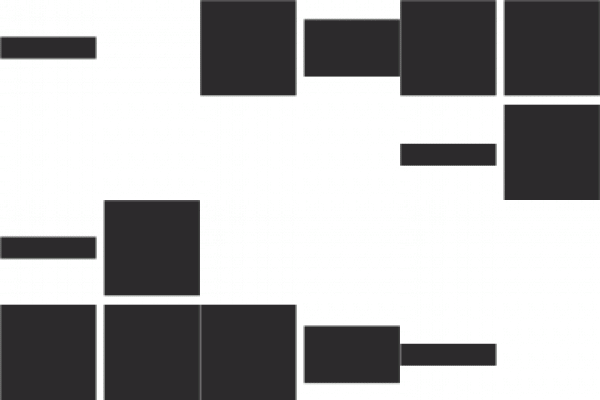
Pay your child’s school fees quickly and conveniently using the QR code or UPI details below.
Open Google Pay, PhonePe, Paytm, BHIM, or your preferred UPI app.
Scan the school's official fee-payment QR code shown on this page.
Enter the applicable fee amount and verify the recipient name before paying.
After successful payment, take a screenshot or download the transaction receipt for your records.

| Detail | Information |
|---|---|
| School Name | Aryaman Public School |
| UPI ID | aryaman664@fbl |
| Account Name | Aryaman Public School |
| Payment Purpose | School Fee |
✓ Verify that the recipient name is Aryaman Public School
✓ Confirm the correct fee amount
✓ Check the UPI ID before paying
✓ Save your payment receipt
✓ Keep your UPI transaction/reference number
✓ Save your payment receipt.
✓ Note down the transaction/UPI reference number.
✓ Contact the school office if the payment isn't reflected in your account/fee record.
Please verify the school name/recipient displayed in your UPI app before completing the payment. Do not make a payment if the displayed recipient details do not match the school's official payment information.
Aryaman Public School will never ask you to share your UPI PIN, OTP, ATM PIN, card PIN, or banking password. Do not make a payment if the recipient details shown in your UPI app do not match the School's official payment details.
Please refer to the fee information/document provided by the School or check the fee details HERE. For further assistance, please contact the School office.
You can make the payment by scanning the QR code using BHIM or other UPI-enabled apps supported by your bank/payment provider.
Please check your UPI/bank application for the transaction status. If the amount has been debited but the payment is not reflected in the School's records, contact the School office with your transaction reference number.
Please contact the School office and provide your transaction/reference number and payment receipt.
Aryaman Public School
RZ-127, West Krishna Vihar, Main Khaira Road,
Najafgarh, New Delhi – 110043
Email: aryaman1565@gmail.com
Phone: +91-9643440008

At Aryaman Public School, intellectual growth is cultivated in concert with moral character, aesthetic sensibility, and physical well-being producing graduates of integrity and substance.
Copyright Ⓒ 2026, Aryaman Public School. All rights reserved. Website Created by Priyanka Mogha.